
Automating Customer Support Flows with Zoho Ticketing and n8n workflows
Anup Singh
Share
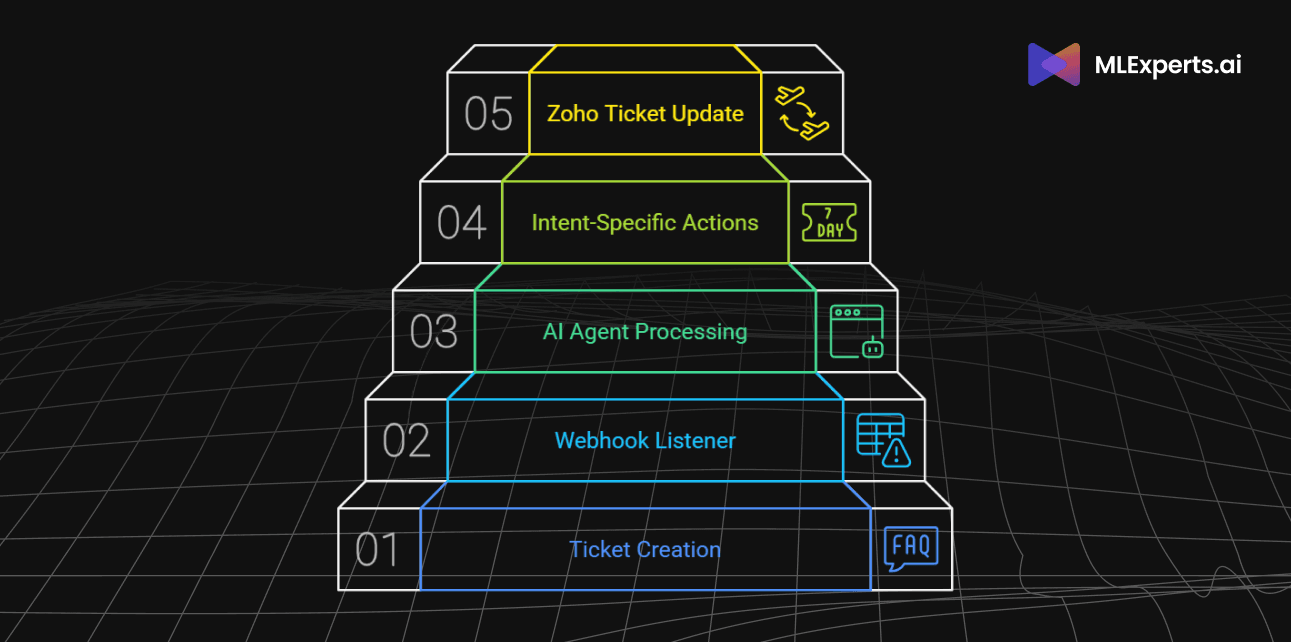
In today’s fast-paced customer service environment, handling support tickets efficiently is crucial. The integration of Zoho Desk, n8n, and AI-powered categorization enables automation that streamlines ticket management. This blog explores how we automated ticket processing through an intelligent workflow.

Ticket Creation in Zoho
The process begins when a user emails the support address:
customer-support@business.com. This triggers an event in Zoho Desk, automatically generating a new ticket. Once a ticket is created, Zoho sends a webhook notification to an n8n workflow, initiating the automation process. Following are the components in the n8n workflow.
Webhook Listener
The first step in the workflow is an n8n webhook listener that captures incoming data from Zoho Desk. Key ticket details, such as:
-
ticket_id
-
subject
-
description
are extracted for further processing.
AI Agent Processing
An AI-powered Chat API node analyzes the subject and description to determine the ticket's intent. It categorizes the request into one of the predefined categories:
-
Technical Issue
-
Router Issue
-
Switches
-
Customer Support
-
Network Problem
-
Others
The AI Agent returns a structured JSON response containing:
-
ticket_id
-
intent
-
description
Intent-Specific Actions
Once the ticket is classified, different workflows are triggered based on the intent:
-
Router Issue → The ticket details are logged into a PostgreSQL database.
-
Customer Support → A notification is sent to a Discord channel via a webhook to alert the support team.
Zoho Ticket Update
Once all workflow actions are completed, the final node in n8n updates the Zoho ticket using an HTTP API request. The update includes:
-
Changing the ticket status (e.g., "In Progress", "Resolved")
-
Updating the description with relevant details
-
Assigning the ticket to the appropriate support agent
Conclusion
By leveraging Zoho Desk, n8n, and AI, this workflow ensures seamless ticket processing, reducing manual intervention and response time. Automating ticket classification and routing allows support teams to focus on resolving issues rather than handling administrative tasks.
Implementing such a workflow improves efficiency, enhances customer satisfaction, and optimizes support operations. If you're looking to automate your ticketing system, integrating AI-powered workflows with n8n is the way forward!